You asked for the out-the-door price. The dealer sent you a buyer's order, purchase worksheet, pencil, quote, or some other sheet covered in numbers. Great. Now you just have to figure out which number is actually the price of the car, which charges are being added, why there are three different totals, and whether the number at the bottom even means what you think it means.
That is the part that gets messy.
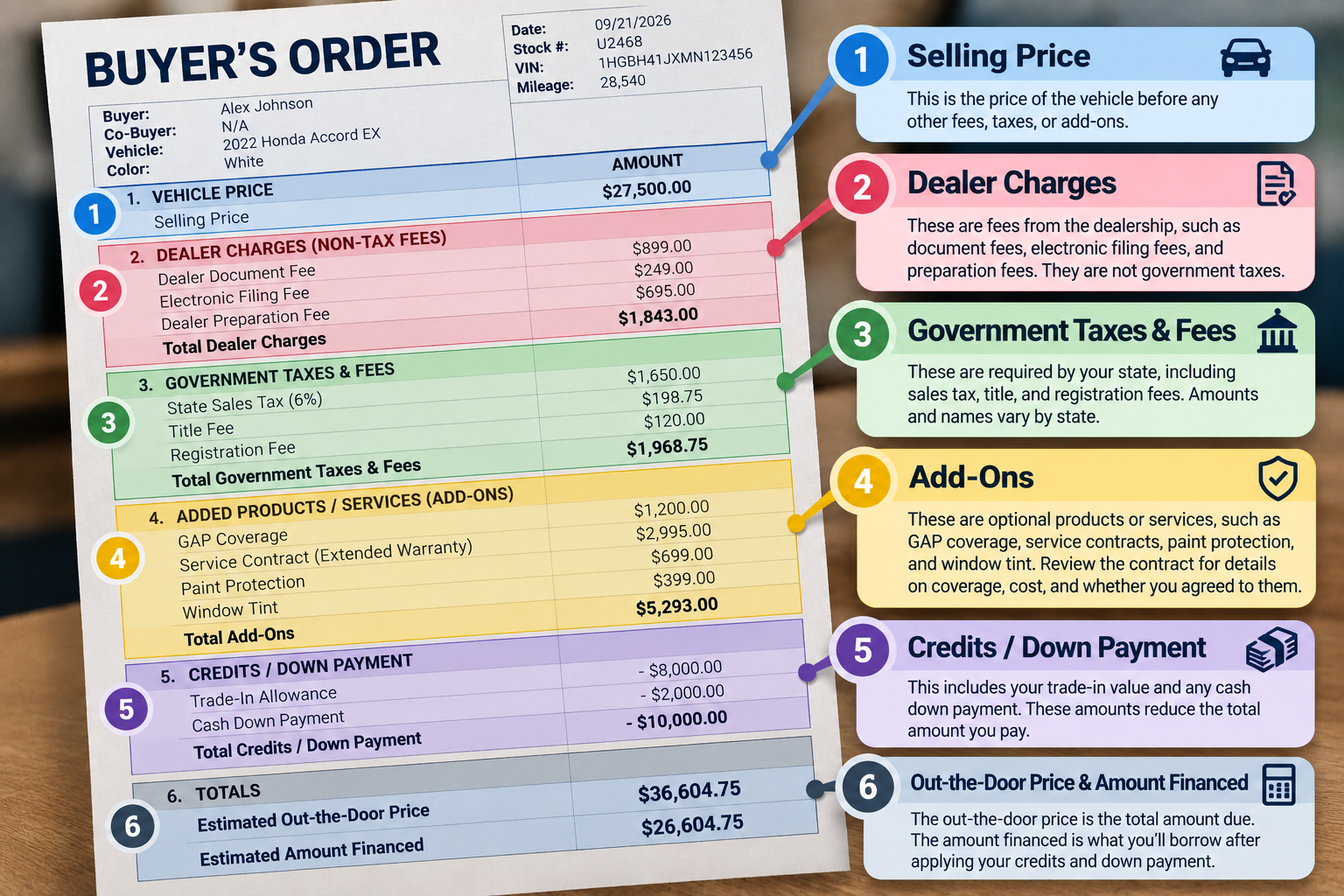
A buyer's order is useful because it puts the deal on paper, but there is no single universal layout. One dealer may call a number “selling price,” another “adjusted price,” and another may bury the same idea halfway down a worksheet. The trick is not memorizing every possible label. It is figuring out what job each number is doing.
First: find the price before financing gets involved
The out-the-door price is the total price of the vehicle before financing, including taxes and fees. That distinction matters. The amount financed is a loan number. Your monthly payment is a loan number. Neither one is automatically the same thing as the price of the vehicle transaction.
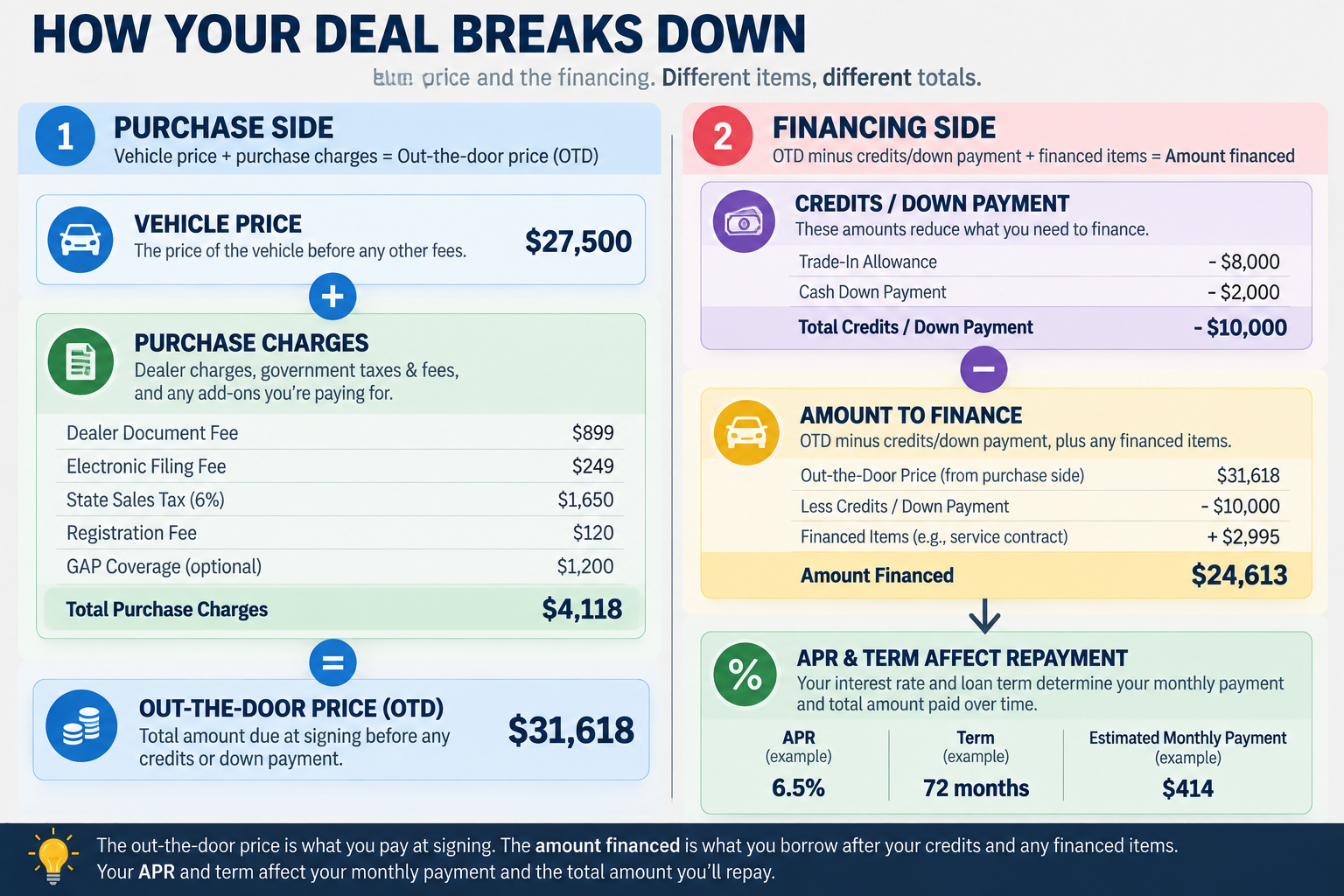
So when I look at a dealer sheet, I want to separate the purchase from the financing first. Otherwise a down payment, trade credit, loan amount, APR, or monthly payment can make a perfectly ordinary purchase total look like it changed when it did not.
Start with the vehicle or selling price
Look for labels such as vehicle price, selling price, cash price, agreed price, adjusted price, or a similar starting number. Do not assume MSRP is the number the deal actually starts from. MSRP can appear on the same paperwork as the negotiated or advertised selling price.
Once you find the starting price, work downward. Ask one boring but extremely useful question for every line: does this add money, subtract money, or just describe a subtotal?
That simple pass catches a surprising amount of confusion.
Then sort the lines into buckets
I use a few broad buckets instead of trying to memorize every possible fee name:
- Vehicle price: the price the transaction starts from.
- Government taxes and fees: amounts such as sales tax, title, registration, or other charges imposed by a government agency.
- Dealer charges: document, processing, administrative, preparation, electronic filing, or similarly named charges imposed by the dealer.
- Add-ons and products: service contracts, GAP products, protection packages, accessories, etching, tire-and-wheel products, and other extras.
- Credits and adjustments: rebates, discounts, trade credit, cash down, deposits, or other amounts that reduce some later total.
- Totals and reference numbers: subtotals, OTD totals, balance due, amount financed, monthly payment, and other numbers that may summarize rather than add another charge.
A weird label does not automatically mean a bad fee. It means you should not guess what it is. If “non-tax fee,” “service fee,” or “protection” is sitting on the sheet and you cannot tell what it pays for, ask.
OTD and amount financed are not interchangeable
This is one of the easiest places to get lost.
Suppose the purchase side of the worksheet reaches an out-the-door total. After that, the deal may apply a cash down payment, deposit, trade credit, or other adjustment before showing an amount financed. That financing number can therefore be lower than the OTD price. On another deal, financed optional products or other items can affect the credit side too.
The CFPB notes that optional add-on products included in an auto loan increase the amount borrowed, and the FTC likewise warns buyers to look at the cost of financed add-ons rather than focusing only on the monthly payment.
Reconcile the math instead of trusting the labels
If the sheet says the selling price is one number and the OTD total is another, try to account for the difference line by line.
- Start with the selling price.
- Add the charges that actually belong in the purchase total.
- Subtract purchase-side rebates or discounts where the sheet applies them.
- Compare your result with the stated OTD or delivered total.
- Only after that, follow trade, cash down, deposits, or other financing-side adjustments toward the amount financed.
If your arithmetic does not land on the dealer's number, do not force it. There may be an aggregate line that already includes smaller components, a tax calculation you cannot reproduce from the sheet alone, or a line whose role simply is not clear. “I can't reconcile this yet” is more useful than confidently counting the same $800 twice.
Compare the paperwork you have, not just the bottom line
If you have an ad, texted quote, earlier worksheet, and final buyer's order, keep them. The final total matters, but so does understanding how you got there.
Two versions can land on a similar total while the lines underneath change. A discount might disappear while another number moves. An add-on might appear. A trade or down payment might be presented in a way that makes the new bottom line look more attractive. None of those things proves something improper happened. It does mean the versions are worth comparing.
The FTC recommends getting the OTD price in writing before visiting the dealership and before discussing financing. Written quotes make it much easier to compare offers and catch charges or add-ons that appear later.
Questions worth asking before you sign
- “What exactly is this line for?”
- “Is this charged by the government or by the dealership?”
- “Is this product optional?”
- “Which number on this sheet is the out-the-door price before financing?”
- “Why is this selling price different from the price in the earlier quote or ad?”
- “Can you show me how these lines add up to this total?”
You do not need a dramatic confrontation. You need the numbers to make sense.
What the OTD Decoder can and cannot do
The free OTD Decoder helps organize pasted dealer quote or worksheet line items, classify what they appear to represent, and reconcile the numbers when the document gives enough information. It is not a vehicle valuation tool, a loan optimizer, or legal advice. It also will not tell you “buy” or “walk away.” The point is simpler: make the sheet readable enough that you know what you are looking at and what you still need to ask.
Before pasting anything, leave out or redact personal information such as your Social Security number, account numbers, date of birth, and full street address.
When the sheet still does not make sense
Some worksheets are genuinely messy. If the numbers changed between versions, an unfamiliar line is affecting the total, or you still cannot reconcile the deal after sorting it out, that is what the Deal Sheet Second Look is for. It is a manual review of the paperwork and the questions it raises, not a recommendation to buy or reject the car.
Quick answers
Is a buyer's order the same as an OTD quote?
Not necessarily. A buyer's order may contain enough information to show or calculate an OTD price, but document names and layouts vary. Look at the actual line items and totals rather than relying on the title at the top.
Does OTD include financing?
No. OTD is the total vehicle price before financing, including taxes and fees.
Is amount financed the same as OTD?
No. Amount financed belongs to the credit side of the transaction and can be affected by down payment, trade credit, financed products, and other adjustments.
What if the dealer's math does not add up?
Ask the dealer to explain the calculation line by line. Do not assume an unexplained difference is automatically wrongdoing, but do not ignore it either.